

Description
GateCHA CAPTCHA connects your WordPress site to your own GateCHA instance — a self-hosted, open-source CAPTCHA management service based on the ALTCHA proof-of-work protocol.
No server? Every feature of the plugin works with a GateCHA you host yourself, for free. If you would rather not run one, the optional GateCHA Cloud service, for businesses, hosts it for you in France: one click in Settings GateCHA, and you come back with everything filled in.
Why GateCHA?
- Privacy-first — No cookies, no fingerprinting, no user tracking. Fully GDPR-compliant.
- Self-hosted — Your challenges and verifications stay on your own server. No data goes to third parties.
- Proof-of-work — Bots must solve a computational puzzle. No annoying image puzzles for humans.
- Centralized stats — Track challenges issued, verified, and failed across all your sites from one dashboard.
- Interaction signals — Optional second opinion on each submission, scored from counts and durations alone. Off by default.
Supported forms:
- WordPress login, registration, password reset, and comments
- WooCommerce login, registration, and password reset
- Contact Form 7
- WPForms
- Gravity Forms
- Elementor Pro Forms
- Forminator
- Formidable Forms
- HTML Forms
- Custom placement via
[gatecha]shortcode
Setup in 2 steps:
- Enter your GateCHA instance URL
- Enter your API key
That’s it. Enable CAPTCHA on the forms you want to protect.
External Services
This plugin connects to your self-hosted GateCHA instance for CAPTCHA challenge generation and verification. Two API calls are made:
- GET /api/v1/challenge — Fetched by the user’s browser to obtain a proof-of-work challenge.
- POST /api/v1/verify — Called from your WordPress server to verify the solved challenge.
One more request happens only when Collect Interaction Signals is enabled, which it is not by default:
- GET /api/public/his.js — The interaction-signal collector, loaded by the user’s browser from the same instance. It measures aggregates on the pages that carry a CAPTCHA (durations, event counts, total pointer distance, typing rhythm variance) and hands them to your WordPress server with the form, which forwards them to /api/v1/verify. It reads no field values, no pointer coordinates and no key contents.
One more request happens only when a Stats Token is saved in the settings, which it is not by default:
- GET /api/v1/stats — Called from your WordPress server, at most once every 10 minutes and only when an administrator opens the WordPress dashboard or Settings GateCHA, to read this key’s statistics (counts of challenges, verified and failed submissions per day, and per country). It sends the stats token and nothing about your visitors.
One more service is contacted only if an administrator clicks Use GateCHA Cloud on Settings GateCHA:
- GateCHA Cloud (cloud.gatecha.com), the optional hosted GateCHA. The click sends the admin’s browser there with this site’s address, a return address in this site’s admin and a random value that protects the round trip. After sign-up and payment on that service (payments are processed by Stripe), the browser comes back with a one-time code, and your WordPress server exchanges it with cloud.gatecha.com for the GateCHA URL, API key and stats token, which it saves in the settings. From then on, GateCHA Cloud is the GateCHA server of items 1 to 4. Terms: https://gatecha.com/cgv — Privacy policy: https://gatecha.com/confidentialite
No data is sent to any third-party service. All communication is between your WordPress installation and your own GateCHA instance at the URL you configure in Settings GateCHA.
- GateCHA source code: https://github.com/Upellift99/GateCHA
Source Code
The full source of this plugin is available at https://github.com/Upellift99/GateCHA-WordPress.
The plugin’s own JavaScript (assets/js/gatecha.js) and CSS (assets/css/gatecha.css) are shipped unminified and human-readable.
The plugin bundles one third-party library in minified form:
- ALTCHA widget —
assets/js/altcha-widget.min.js- Version: 3.2.2
- License: MIT
- Source code: https://github.com/altcha-org/altcha
This is the unmodified production build distributed on npm as the altcha package (it corresponds to the package’s dist/main/altcha.min.js build). To obtain and review the human-readable source, run npm install altcha@3.2.2 and inspect the package’s src/ directory on GitHub.
Screenshots
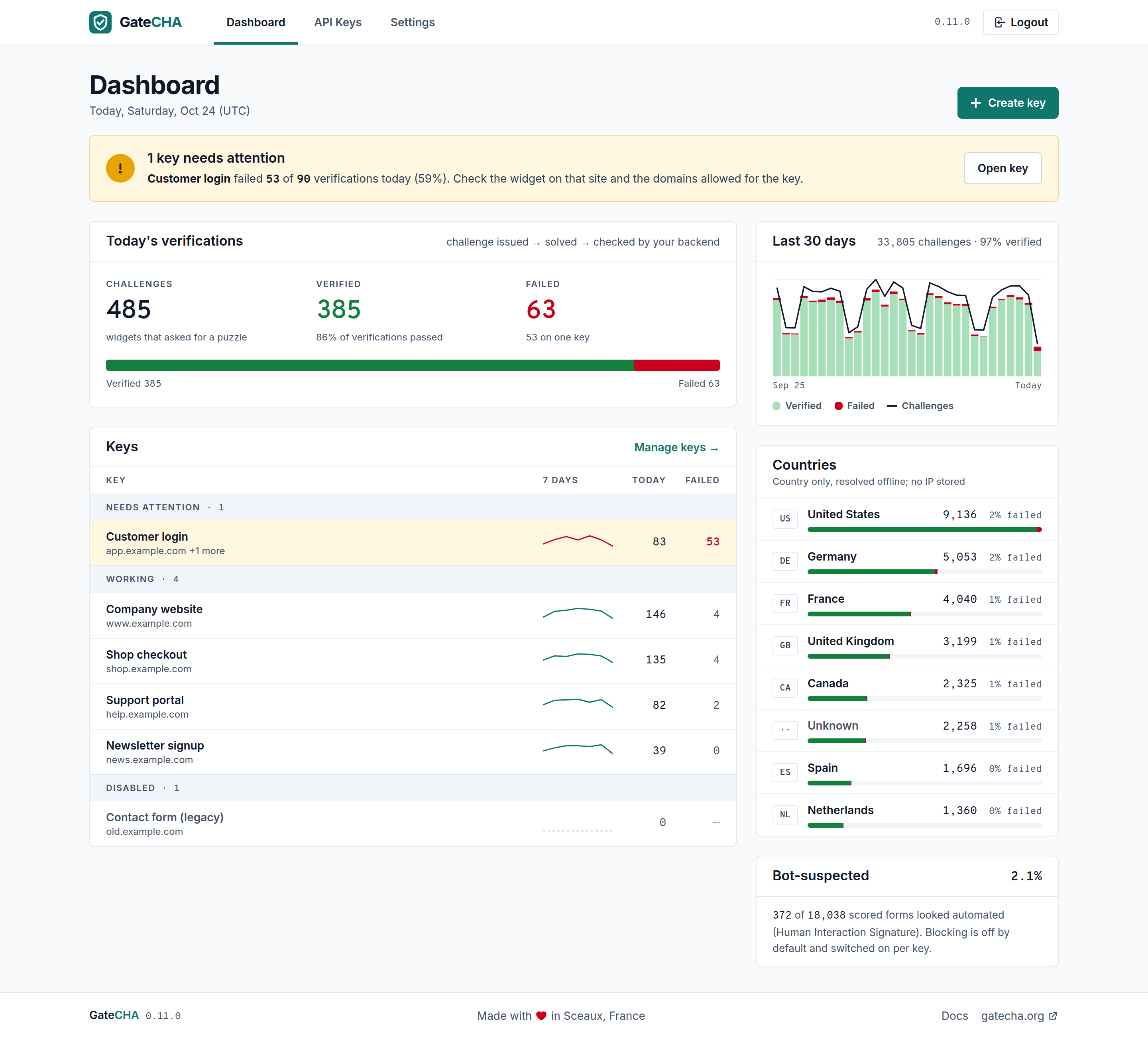
The GateCHA server dashboard leads with what needs attention: a key failing today is named with its numbers, above the day’s verifications and every site’s key grouped by status.
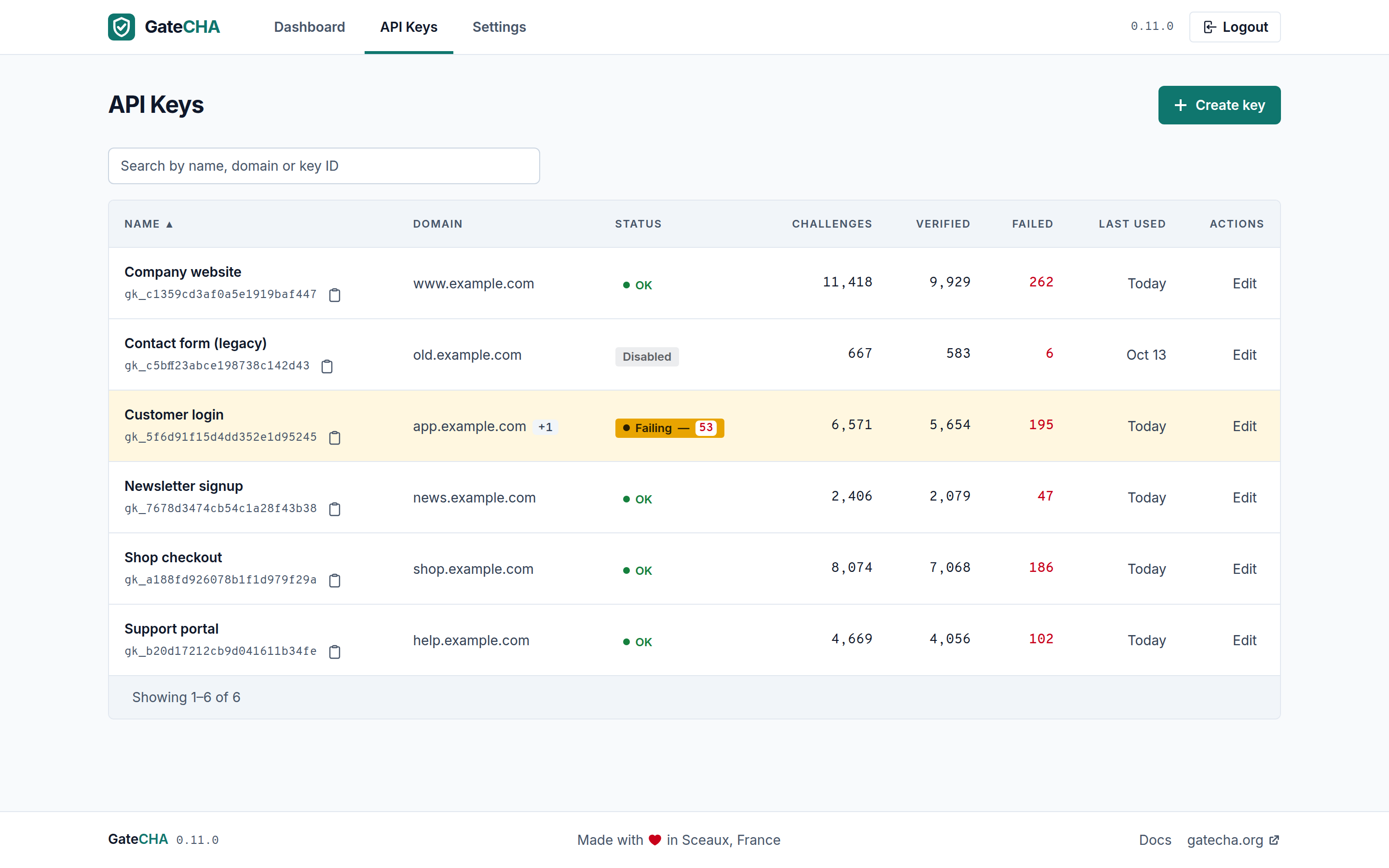
One API key per site, each with its own difficulty, challenge TTL and allowed domains, so a single GateCHA instance serves every site you run.
Installation
- Upload the
gatecha-captchafolder to/wp-content/plugins/ - Activate the plugin through the Plugins menu
- Go to Settings GateCHA
- Enter your GateCHA URL and API key
- Enable CAPTCHA on the forms you want to protect
Requirements:
- A running GateCHA instance
- An API key from your GateCHA dashboard (starts with
gk_)
FAQ
-
What is GateCHA?
-
GateCHA is a self-hosted CAPTCHA management service that wraps the ALTCHA proof-of-work protocol. It provides API key management, multi-site support, and an analytics dashboard. See the GateCHA website for more information.
-
How does proof-of-work CAPTCHA work?
-
Instead of asking users to solve image puzzles, the browser solves a small computational challenge in the background. This is invisible to legitimate users but expensive for bots trying to submit forms at scale.
-
Is my API key secure?
-
The API key is used in the browser to fetch challenges, similar to how reCAPTCHA and hCaptcha use site keys. You can restrict your API key to specific domains in your GateCHA dashboard for additional security.
-
Does this plugin send data to external services?
-
Only to the GateCHA server you configure: your own instance, or GateCHA Cloud if you choose it. Nothing is sent to Google, Cloudflare or any other third party. See the External Services section below.
-
What is GateCHA Cloud?
-
An optional paid service for businesses (companies, freelancers, agencies) that runs the GateCHA server for you, hosted in France, with a free 30-day trial and no card needed. The plugin offers it on Settings GateCHA only while no server is configured, next to the free self-hosted option, and contacts it only when you click Use GateCHA Cloud. Nothing in the plugin is locked behind it: a self-hosted GateCHA gives you every feature.
-
What are interaction signals?
-
Proof-of-work proves a browser did the work. It does not prove a human filled the form in, and a headless browser solving the challenge passes it exactly like a visitor does. Interaction signals describe how the form was filled: how long the page was open, whether the pointer moved and how far, how many scrolls, touches and keystrokes there were, and how irregular the typing rhythm was. Your GateCHA instance turns those eight numbers into a score between 0 and 1, where higher means more likely automated.
Only aggregates leave the browser. Never what was typed, never where the pointer was, never an IP address. Turn it on under Settings GateCHA Interaction Signals.
-
Does enabling interaction signals block anyone?
-
Not by itself. Collection only records scores, which you can watch on your GateCHA dashboard under HIS Monitor. Rejecting flagged submissions is a second, separate setting.
Turn that second one on only once you have watched your own traffic, because a false positive is invisible: the visitor cannot submit and will not tell you. To see the scores in your own logs first, hook the
gatecha_his_resultaction:add_action( 'gatecha_his_result', function ( $score, $suspected ) { error_log( "GateCHA HIS $score" ); }, 10, 2 ); -
What happens when my GateCHA server is down?
-
It depends on Settings GateCHA Failure Mode.
- Fail closed (the default): protected forms cannot be sent until the server is back. Safer against spam, but visitors are blocked during the outage.
- Fail open: forms keep working. If the visitor’s browser cannot reach GateCHA (server down or not answering for 15 seconds, or API key disabled), the CAPTCHA is replaced by a short note and the form can be sent. Before accepting it, your WordPress server checks GateCHA itself; a submission without a solved CAPTCHA is only accepted when GateCHA really is unavailable, so a bot that skips the CAPTCHA while your server is up is still refused.
Either way, an administrator notice reports the outage in wp-admin.
-
Can I see my CAPTCHA statistics in WordPress?
-
Yes, with GateCHA 0.12.0 or later. On your GateCHA dashboard, open the key this site uses and click Generate next to Stats token, then paste the token (it starts with
gs_) in Settings GateCHA Stats Token. A GateCHA CAPTCHA widget then appears on the WordPress dashboard with today’s verified and failed submissions, the last 30 days and the top countries, and the full view sits at the top of the settings page.The token is read-only and only opens this key’s statistics. It never leaves your WordPress server: the numbers are fetched server-side and kept for 10 minutes. Leave the field empty and no statistics request is made.
-
Can I use this with a custom form?
-
Yes, use the
[gatecha]shortcode to place the widget anywhere. Then verify thealtchaPOST field server-side. -
How do I bypass the CAPTCHA for automated testing (e.g. Playwright)?
-
Define a bypass token in your
wp-config.php:define( 'GATECHA_BYPASS_TOKEN', 'your-secret-test-token' );Then in your tests, set the
altchahidden input to this token before submitting the form:document.querySelector('input[name="altcha"]').value = 'your-secret-test-token';The plugin will accept the token as a valid verification without contacting the GateCHA server. Never define this constant in production.
Reviews
There are no reviews for this plugin.
Contributors & Developers
“GateCHA CAPTCHA” is open source software. The following people have contributed to this plugin.
Contributors
Translate “GateCHA CAPTCHA” into your language.
Interested in development?
Browse the code, check out the SVN repository, or subscribe to the development log by RSS.
Changelog
1.5.0
- No GateCHA server yet? Settings GateCHA now offers two ways to get one: host it yourself, free, as before, or use GateCHA Cloud, an optional paid service for businesses, hosted in France, with a free 30-day trial and no card needed. One click, sign up, and you come back with the GateCHA URL, API key and stats token filled in. The values are exchanged between your WordPress server and the service, never through the browser. Nothing is sent before you click.
- Translated in German and French.
1.4.1
- Your CAPTCHA statistics in WordPress. Paste a stats token from your GateCHA dashboard (GateCHA 0.12.0 or later) in Settings GateCHA and a dashboard widget shows today’s verified and failed submissions, the last 30 days and the top countries. The full view sits at the top of the settings page. Optional: without a token the plugin makes no new request. Translated in German and French.
- Fix: “Fail open” now really keeps forms working when the visitor’s browser cannot reach GateCHA (server down or not answering, API key disabled). Before, the CAPTCHA stayed stuck and blocked the form whatever the setting. A submission without a solved CAPTCHA is only accepted once your WordPress server has confirmed GateCHA is unavailable, so skipping the CAPTCHA still gets a bot nothing while your server is up. “Fail closed” is unchanged.
- 1.4.0 was never offered as an update: it was tagged by mistake with the wrong version number.
1.3.0
- Clearer error messages for visitors. Instead of one “CAPTCHA verification failed.” for everything, the plugin now says whether the “I’m not a robot” check was never completed, did not pass, or could not run because your GateCHA server is unreachable, so visitors know whether to tick the box, try again, or come back later. Translated in German and French.
- Settings GateCHA works with screen readers: every field now has a name (“GateCHA URL”, “WooCommerce — Login: Enable” instead of eighteen identical “Enable” checkboxes), hints are read with their field, and the Failure Mode options are no longer cut off.
- No change to how submissions are verified, and no setting to change.
1.2.0
- Bundled ALTCHA widget updated from 2.2.4 to 3.2.2.
- ALTCHA’s own interaction signature is switched off explicitly, in line with the plugin’s no-fingerprinting promise.
- Widget translations now register into the widget’s i18n store, and the language follows your site locale.
- German and French translations bundled, used until a language pack from translate.wordpress.org replaces them. Previously the widget read “I’m not a robot” on every site, whatever its language.
- No change to the proof-of-work itself, which is identical in both widget versions.
1.1.0
- Optional interaction signals (HIS), off by default: the collector is loaded from your own GateCHA instance and its aggregates are forwarded to /api/v1/verify on every protected form.
- Optional rejection of submissions GateCHA flags as automated, a separate setting from collection.
- New
gatecha_his_resultaction, fired with the score and the flag on every verification that carried signals, for logging your own traffic before deciding to block on it. - Requires GateCHA 0.7.0 or later for these two settings. Older instances are unaffected and keep working as before.
1.0.0
- Initial release.
- WordPress login, registration, password reset, and comments integration.
- WooCommerce login, registration, and password reset integration.
- Contact Form 7, WPForms, Gravity Forms, Elementor Pro, Forminator, Formidable Forms, and HTML Forms integration.
[gatecha]shortcode for custom form placement.